For teachers & schools
Assign the reading. See it read.
Keeps students from feeding reading assignments to AI. Students open the reading from your Canvas course and read their own copy, with their name on every page. You see the pages and minutes for every student, and you can send a reading score straight to the gradebook.
What the student sees
-
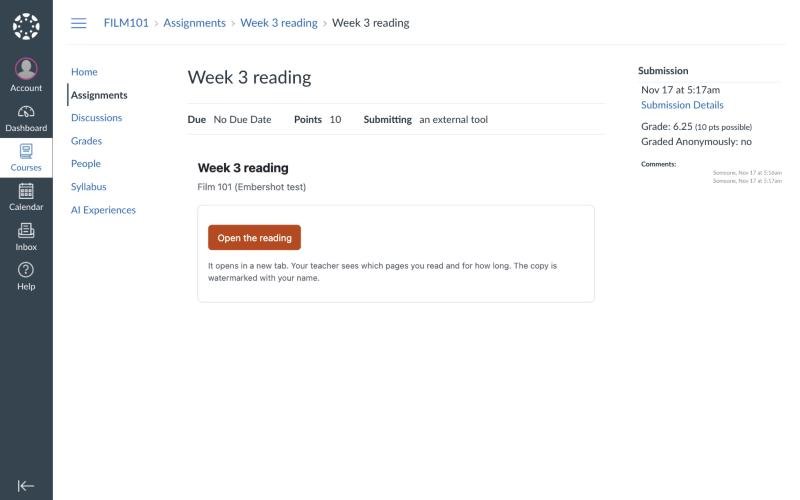
1They open it from Canvas
The reading is an assignment in your course. Students click Open the reading. No account, no password and no code by email: Canvas already knows who they are.
-

2They read their own copy
Every page carries the student’s name and a code. Downloading, printing and copying text are off, so there is no file to drop into an AI tool. Turn on markup for a reading and students can highlight, underline and add notes on their own copy; only they see their marks.
What the teacher sees
-
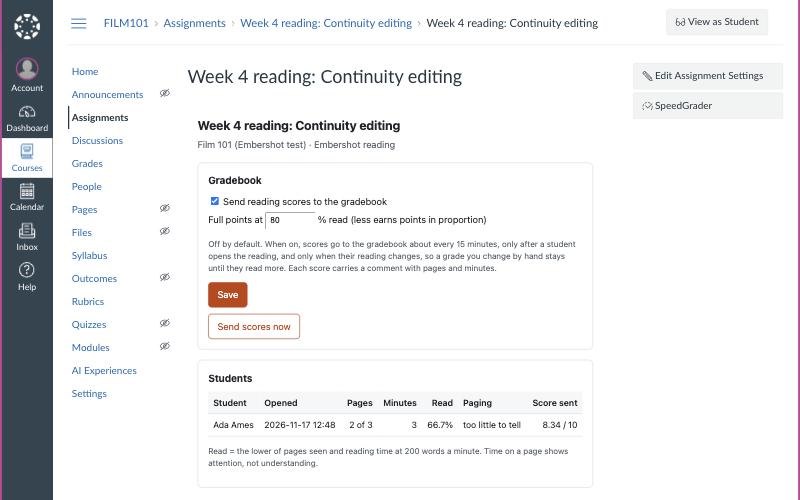
3Pages and minutes for every student
Right in the assignment: when each student opened it, how many pages they saw, how long they spent and how much of it they read.
-
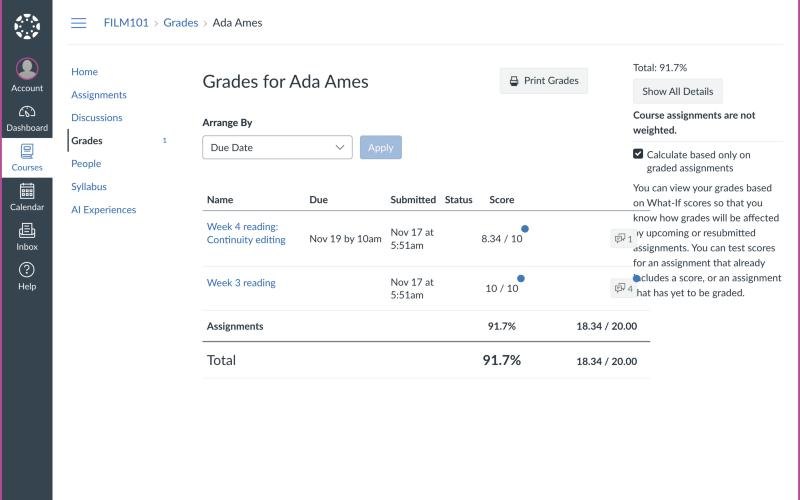
4A score in the gradebook, if you want one
Turn it on per assignment and the score lands in Canvas with a comment like “read 2 of 3 pages, 3 min.” Off by default.
Real Canvas and Embershot screens from a test course, shown with a sample class handout.
Proof of reading, not proof of cheating
Facts, not accusations
Embershot reports what happened: pages seen and minutes spent. It never guesses who wrote an essay. Time on a page shows attention, not understanding, and the page says so.
Read means read
Read percent is the lower of the pages seen and the reading time the document takes at 200 words a minute. A tab left open, or a fast flip to the last page, does not count as reading.
Kept out of AI
Keeps students from feeding reading assignments to AI. Students read page images in Embershot’s viewer, never the PDF. There is nothing to download, nothing to copy and nothing to drag into an AI tool.
AI in the browser sees a blur
Pages blur when the student’s attention leaves the page, and hide when an AI agent drives the browser. In our tests, an AI assistant in the browser saw only a blurred page.
Grades you control
Choose the percent that earns full points; less earns points in proportion. Nothing is sent until a student has read a page, and a grade you change by hand stays until they read more.
Whose copy it was
Every page carries the student’s name and code, so even a photo of a page shows whose copy it was.
Where it fits
Assigned chapters and articles
Know who did the reading before the discussion, not after the quiz.
Scripts in film and theater programs
Screenplays and plays that stay in the course, with each student’s name on every page.
Case studies and course packs
Material licensed for your class that should not end up shared, uploaded or summarized for the whole internet.
Reading before class
For flipped classrooms: see who came prepared, and how much time the class spent on each page.
Set up once for the whole school
Installs like any Canvas app
Your Canvas admin adds Embershot from one configuration link, using LTI 1.3. Teachers then pick it as an assignment’s external tool.
Names only, never emails
Embershot asks Canvas only for the student’s name and their role in the course, never their email address. Students never create an Embershot account.
Your privacy agreement
We sign schools’ student data privacy agreements, and we never sell student data or use it for advertising.
High school and college
Built for students 13 and older. See our privacy policy.
Pricing
Teacher
$149 a year
One teacher, all of their courses. Your Canvas admin adds Embershot once. Try it with one class free for a term.
- Readings in your Canvas assignments
- Pages and minutes for every student
- Reading scores in the gradebook
- Each student’s name on every page
- Highlights and notes on each student’s own copy, when you turn them on
School or department
$2 per student a year
$1,500 a year minimum, billed annually.
- Everything in Teacher, for every teacher
- One Canvas install for the whole school
- Your student data privacy agreement, signed
- Setup within one business day
Students never pay. Write to us to start a trial or a school license.
Bring Embershot to your courses
We are setting up our first schools now. Tell us about your courses and your Canvas.